Gear Intelligence
Best Golf Launch Monitors Under $1,000: 2026 Tested
Best golf launch monitors under $1,000: five 2026 picks for indoor simulators, range work, real data, and buying tradeoffs that matter most at home now.


The best golf launch monitors under $1,000 do not all solve the same problem. One is a serious simulator engine. One is a range-first data machine. One is a budget practice aid that happens to record a useful swing video. Buying the wrong lane is how a good product becomes an expensive disappointment.
Disclosure: This article contains affiliate links. If you buy through these links, ClickitGolf may earn a commission at no additional cost to you.
We scored these on published specs, independent testing data, and verified owner feedback. The five picks below were chosen for distinct jobs, not because every affordable monitor deserves a place in a simulator bay. Prices change, so the categories are positioned by value rather than a hard price.
Best golf launch monitors under $1,000: the fast answer
| Monitor | Best for | Key data and use | Indoor reality |
|---|---|---|---|
| Rapsodo MLM2PRO | Best overall home practice | Dual-camera capture and measured spin | Strong, but needs enough room and compatible balls for spin |
| Garmin Approach R10 | Best range-to-home value | Portable radar, club and ball metrics | Useful with the right setup, less exact on spin than camera systems |
| Voice Caddie SC4 PRO | Best built-in display | Portable radar, screen, voice feedback | Designed for indoor and outdoor practice |
| Square Golf Home | Best compact indoor simulator | Photometric ball and club data | Its natural lane, with limited Amazon availability |
| Rapsodo MLM1 | Best budget data-and-video tool | Camera plus radar, iOS only | Works in a net, but lighting and space matter |
How to choose without buying the wrong technology
Start with the space, then choose the monitor. Radar units sit behind the ball and need a clean target line. Camera-based systems usually live beside or ahead of the strike zone and can make more sense in a shallow room. Next decide whether you are buying ball-flight information, simulator play, or simple practice accountability. Those are three different mandates.
For a net bay, measure both ball-to-screen distance and the device’s required placement. For a range player, battery life, setup speed, and app friction matter more than a long list of simulator courses. Finally, do not treat calculated and measured spin as interchangeable. The difference becomes more visible as you move from full-swing practice to fitting, short-game work, or a dedicated virtual course setup.
1. Rapsodo MLM2PRO: best overall for the golfer building a real practice loop
The MLM2PRO is the recommendation for the golfer who wants a portable monitor that can become the center of a credible home practice routine. Rapsodo combines dual cameras with radar, records 15 metrics, and uses its RPT ball system to measure spin rate and spin axis. That matters because spin is not a decorative number. It makes distance, shot shape, and gapping information more useful.
Independent testing from MyGolfSpy praised the amount of feedback and simulation value at this end of the market, while also making clear that setup and the right ball are part of the deal. It is not the monitor to buy if you hate memberships or want every session to work with whatever range ball is nearby. It is the one to buy when video, measured spin, and a serious app ecosystem outweigh that friction.
Lab Score: 7.6/10. Performance 8.5, Forgiveness 6.5, Feel 7.5, Value 8.0, Looks 7.5. The performance score reflects dual-camera capture and measured spin with RPT balls. The setup score is lower because that same fidelity asks more of the room, ball, and app workflow.
Check the Rapsodo MLM2PRO on Amazon
2. Garmin Approach R10: best range-to-home value
The Approach R10 remains the easy recommendation for the golfer who wants a monitor that can travel from the backyard to the driving range without turning setup into an event. Garmin says it tracks more than a dozen data points, records swing video through the Garmin Golf app, and can support virtual rounds with an active subscription. Its compact size and long battery life make it a better all-round practice companion than a fixed indoor system.
The tradeoff is familiar to radar users. Ball speed and launch can be productive inputs, but spin and detailed shot-shape work need the correct environment, enough flight, and sensible expectations. MyGolfSpy’s Garmin launch-monitor reporting reinforces the larger point: portable systems excel when the use case is honest. Use the R10 for repeatable training and simulator fun, not as a replacement for a premium fitting bay.
Lab Score: 7.6/10. Performance 7.5, Forgiveness 6.5, Feel 7.5, Value 8.5, Looks 8.0. Garmin’s published portability, app depth, and battery support the value score; verified owner feedback is more mixed on connectivity and indoor distance precision.














Check the Garmin Approach R10 on Amazon

3. Voice Caddie SC4 PRO: best for the player who wants data without a phone-first session
The SC4 PRO is the answer for a golfer who would rather see numbers on a built-in display than mount a phone every time the practice mat comes out. Voice Caddie lists a 5.3-inch screen, voice output, indoor and outdoor use, and access to its app and 3D driving-range ecosystem. The official Amazon bundle also adds an alignment stand and protective pouch, which makes its price position easier to justify for a golfer building a repeatable station.
Its limitation is that there is less broad independent lab evidence than for the Rapsodo and Garmin models. That does not make it a weak choice. It means the recommendation should be narrower. Buy it for the standalone presentation and simple session flow, not because a small review count makes it the safest universal accuracy call.
Lab Score: 7.3/10. Performance 7.5, Forgiveness 7.0, Feel 8.0, Value 7.0, Looks 7.0. Manufacturer-published indoor/outdoor modes, screen, and real-time data support the scores. Verified owner sentiment on the official listing is positive but limited in volume, so the score stays conservative.
Check the Voice Caddie SC4 PRO bundle on Amazon
4. Square Golf Home: best compact indoor simulator pick
Square Golf Home makes the most sense for the player whose room is the limiting factor. Its camera-based, photometric approach is meant for an indoor simulator environment, not a range session. Square lists ball and club delivery data, automatic putting, a compact footprint, and compatibility with common simulator software. That package makes it one of the more interesting under-$1,000 indoor options because the technology is aligned with the environment.
The important caveat is availability. We did not find a compliant in-stock Amazon listing for the standard Square Golf Home monitor during this pass. Do not replace it with a lookalike, an accessory, or a marked-up third-party listing. If a dedicated indoor bay is the actual priority, the Square belongs on the shortlist. If portability is the priority, it does not.
Lab Score: 8.0/10. Performance 8.0, Forgiveness 7.5, Feel 8.0, Value 8.5, Looks 8.0. The score follows Square’s published photometric, indoor-first specs and software positioning. It remains a cautious score until a broader independent test base and a compliant affiliate listing are confirmed.
Check Square Golf Home on Amazon
5. Rapsodo MLM1: best budget option if you own an iPhone or iPad
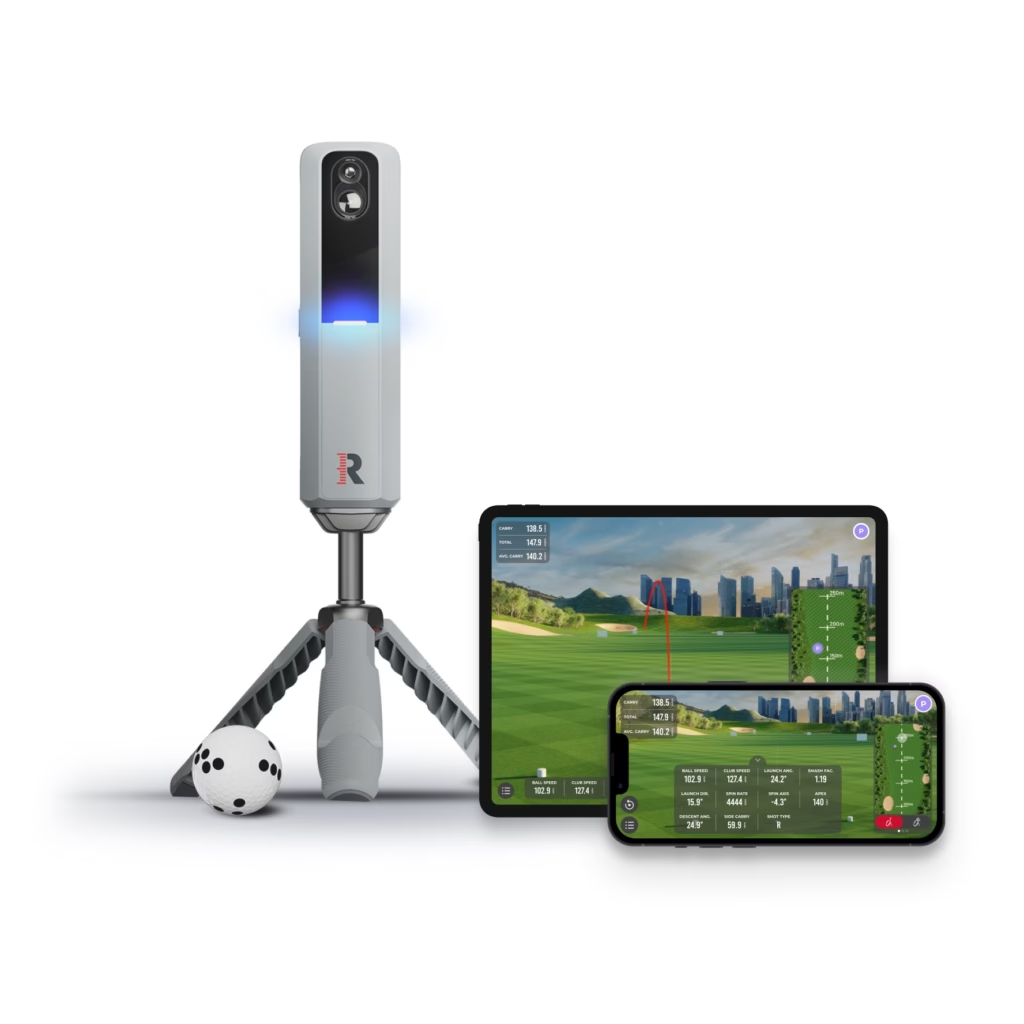
The original Rapsodo MLM1 is the sensible under-$250 practice tool. Rapsodo says it pairs iOS camera capture with radar processing, reports up to 11 core metrics, and supports indoor net mode with enough lighting and ball flight. It also offers swing replay and shot tracing. That is a valuable mix for a golfer who needs feedback on launch, speed, carry, and patterns before spending more on simulation.
It is not a miniature launch lab. An official MyGolfSpy forum review found its outdoor work more consistent than indoor sessions, where lighting, ceiling height, and short ball flight introduced more variation. That is exactly the honest buying case: use it to make practice more accountable, then keep the claims at that level. It is a poor choice for Android users, for a dim garage, or for the golfer who expects exact measured spin from a budget device.
Lab Score: 7.0/10. Performance 6.5, Forgiveness 5.5, Feel 7.0, Value 8.5, Looks 7.5. The lower forgiveness score comes from iOS-only operation and lighting sensitivity. The value score follows published 11-metric capability, full indoor/outdoor support, and the verified owner base.
Check the Rapsodo MLM1 on Amazon
Data that matters, and data that only looks impressive
Ball speed, club speed, launch angle, carry, and launch direction are the core practice metrics. They tell you whether a strike is becoming more repeatable. Spin rate and spin axis are more useful when you need a complete ball-flight picture, want meaningful simulator realism, or are making equipment decisions. A monitor that estimates spin can still be helpful. It simply should not be treated like a device that directly measures it.
For indoor users, the best monitor is often the one with the least impossible setup. Measure ceiling height before comparing feature lists. Then check device placement, ball-to-screen distance, and whether the system needs special balls. A half-committed bay does not become better because its dashboard has more numbers.
One buying rule before you check out
Do not spend all of the budget on the monitor and leave no room for the setup around it. A quality mat, a safe net or screen, correct room measurements, and the balls a system expects are not accessories in the casual sense. They are part of the measurement chain. A modest monitor in a well-aligned, well-lit space creates better practice than a more advanced device shoved into the only empty corner of the garage.
That is also why the “best” pick changes by golfer. The MLM2PRO is the most complete practice and simulation package here, but it is not automatically the best purchase for the player who only needs quick speed-and-carry feedback at the range. Match the monitor to the repetition you will actually make.
FAQ
Are golf launch monitors under $1,000 accurate enough?
They can be accurate enough for structured practice, gapping trends, and simulator play when their setup requirements are met. The best use is repeatable comparison, not an assumption that every indoor shot has fitting-studio precision. Camera, radar, space, ball choice, and lighting all affect the answer.
Do I need a special golf ball?
Only some systems require or benefit from one. Rapsodo’s MLM2PRO uses its RPT ball system to measure spin. Other monitors can operate with a standard premium ball, but every manufacturer has specific setup and ball guidance. Read it before ordering a net or screen.
Which is best for a garage?
Square Golf Home is the more natural compact indoor choice if its availability and software match your plan. Rapsodo MLM2PRO can be strong in a correctly measured space. Garmin R10 and MLM1 need enough room behind the ball and enough flight for their radar and camera systems.
Should I buy a monitor with a subscription?
Buy the subscription only if the premium analytics, cloud history, simulator courses, or game modes are central to your practice. A monitor should still produce useful feedback without making the owner feel that the hardware is incomplete on day one. Confirm the current entitlement list before purchasing.
Can I use these on the driving range?
Garmin R10, Rapsodo MLM2PRO, Rapsodo MLM1, and Voice Caddie SC4 PRO are built for portable outdoor practice. Square Golf Home is mainly an indoor simulator product. At a range, use a quality ball and level alignment, then treat the session as a trend line rather than a one-shot verdict.
The final call
The best all-around choice is the Rapsodo MLM2PRO if measured spin and video belong in your practice plan. Choose Garmin R10 when range portability and value lead. Choose SC4 PRO when a built-in display is the feature you will actually use. Choose Square for a compact indoor-first setup, and MLM1 when budget plus iOS compatibility are the deciding facts.
For more buying guidance, see our best home golf simulator guide, the space a golf simulator actually needs, and how to build a better home practice routine.
Want more golf every Friday? Join 800,000+ golfers on The 19th Hole. Subscribe at clickitgolf.com/newsletter